Using a Mini4 on Tahoe 26.3.1, I am missing ‘Allow accessories to connect’ in ‘Privacy & Security’ in ‘System Settings’. The Plugable USB-C Triple Monitor Docking Station I use must be disconnected / reconnected every time I reboot my Mini4.
Hi there,
Welcome to the community! I am sorry to hear about the issues with your Plugable docking station. I would be happy to help!
To my knowledge, the “Allow accessories to connect” (or “Accessories”) setting is a security feature that Apple only includes on Mac laptops (MacBook Pro and MacBook Air). Because your Mac Mini M4 is a desktop computer, macOS does not include this setting in the Privacy & Security menu.
The issue you are running into is likely related to the DisplayLink Manager app rather than the security settings mentioned above. In the DisplayLink Manager app (in your top Menu Bar), ensure the “Launch automatically after login” box is checked. This ensures the driver relaunches whenever you restart your Mini, so the monitors connect immediately.
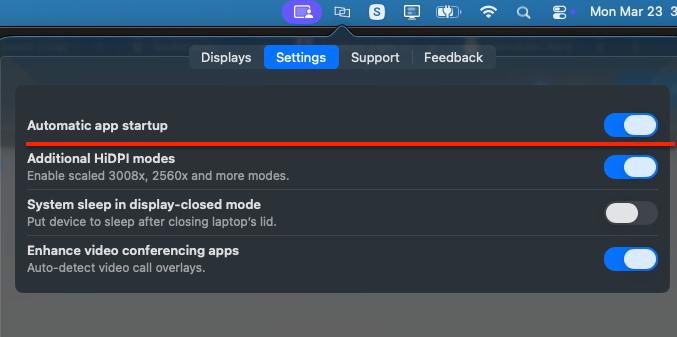
If the issues persist, please consider reaching out to us directly at support@plugable.com with reference to Ticket #493993, and I will do my best to get you up and running.
Thank you,
Adi
Plugable Technologies
This topic was automatically closed 20 days after the last reply. New replies are no longer allowed.