I went through this process from another customer who had issues with 2 and 3. It did not fix the problem but I did this as described.
As a starting troubleshooting step I’d recommend performing a clean reinstallation of the DisplayLink driver. This involves removing the existing driver from the system and installing the latest version. It will also reset the dock’s internal USB hubs which can help resolve issues when one or more functions of the dock aren’t quite working.
Please follow these steps:
Disconnect the dock from the system and please remove the power cable from the dock so it turns off completely (this is important so the unit resets). Please keep it disconnected until the last step
Uninstall any and all software with ‘DisplayLink’ in the title that is present from within the Control Panel > Programs and Features. Don’t worry if these entries are not present or if the process does not work, just move onto the next step
Welcome to the community, and thanks for sharing the steps you’ve already tried. That’s helpful.
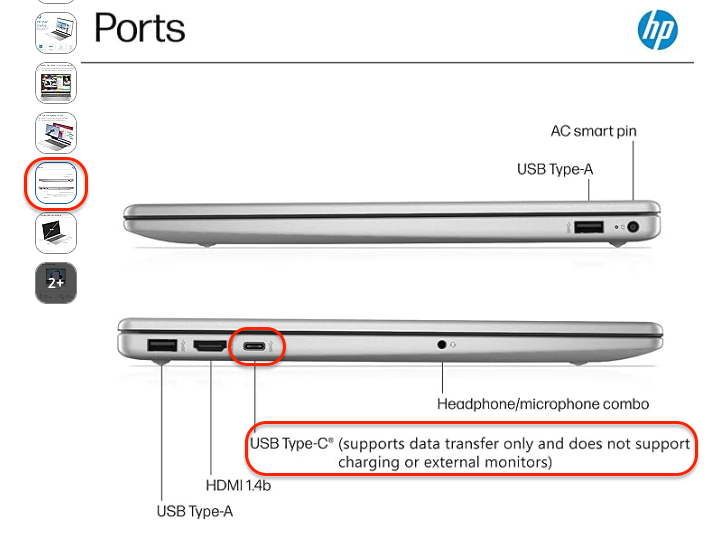
Since HDMI 2 and 3 are working and only HDMI 1 is not, this points us in a different direction. On the UD-ULTCDL, HDMI 1 relies on USB-C DisplayPort Alt Mode from the host system, while HDMI 2 and 3 are powered by DisplayLink.
Because of that, the DisplayLink reinstall wouldn’t affect HDMI 1.
To help narrow this down, could you confirm the make and model of your laptop? Not all USB-C ports support DisplayPort Alt Mode, which would directly affect HDMI 1.
If your system supports Alt Mode and HDMI 1 still does not output while 2 and 3 continue to work, we can look at the next steps from there.
My name is Josh and I am stepping in for Adi who is out of the office.
Thanks for that information, however, unfortunately from the information provided I am not able to tell which specific computer you have.
While the Intel Core i3-N305 processor in your computer can support USB-C video output, this feature is optional and depends on the specific computer configuration and may not be offered with every model.
Can you tell me the actual brand name and model number of your exact computer? Or provide a link to the product page for it online?
Once we know the exact brand and computer model number then we can verify if it’s expected to support USB-C video that drives the HDMI1 output on the dock.