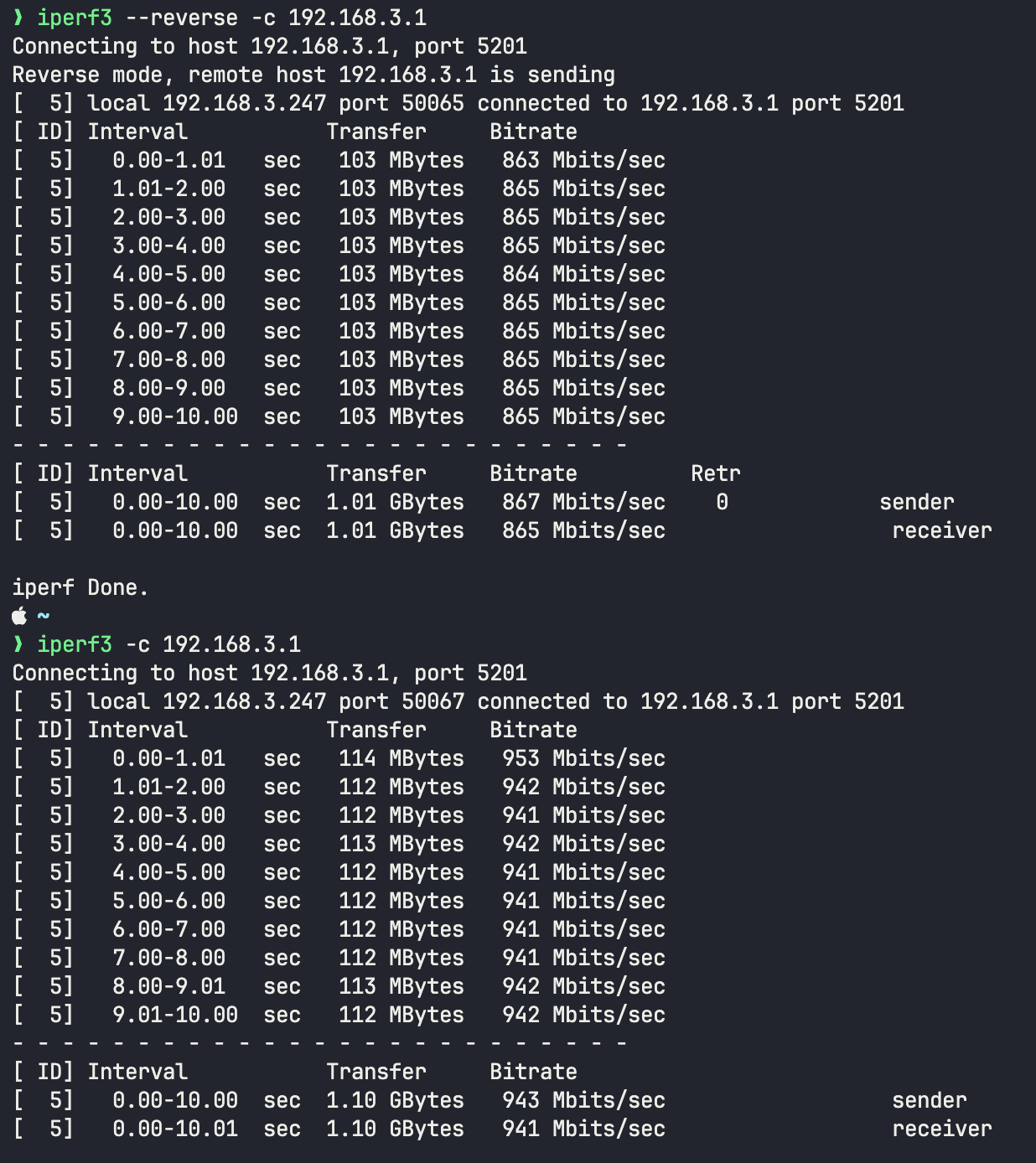
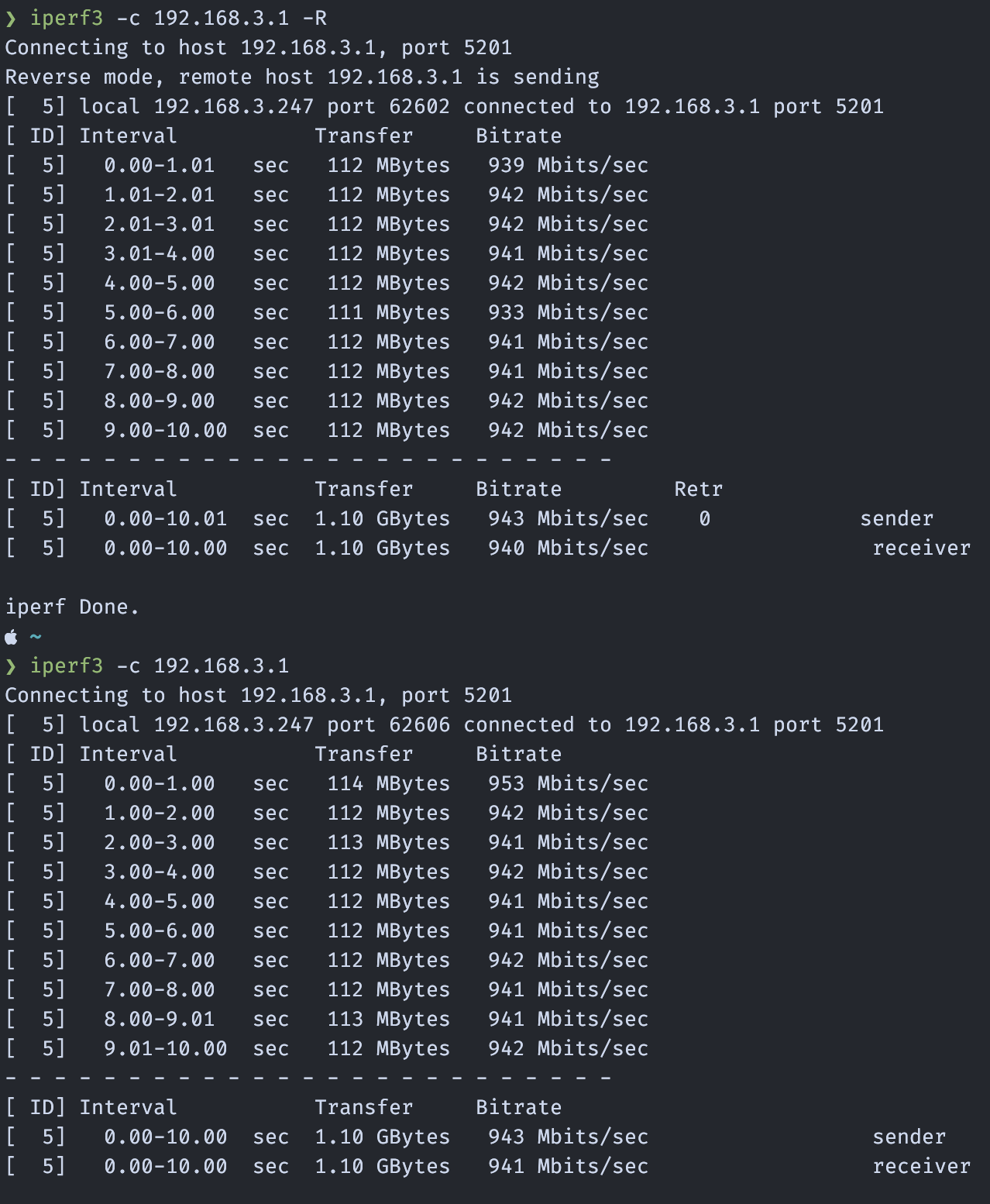
Hi everyone, I’m seeing a consistent speed difference on my Mac ( M4 Max ) between TBT-UDH2 and a generic type-c adapters and wanted to check if this is expected.
With a Ugreen USB-C 1GbE (AX88179A) adapter I get constant 950/960 Mbps in download and same speed on the upload.
With my Plugable TBT-UDH2 dock I get around 860 Mbps DOWN and 940 UP
I repeated the tests multiple times and the difference is consistent. Both are connected at 1Gbps to the router.
Im doing the speed tests on my local network using iperf3 using a openwrt router.
Has anyone seen this on macOS (26.5.1), and could this be related to the dock Ethernet chipset, driver behavior, or dock bandwidth sharing?
Thanks in advance for the support.
—-UPDATE—-
It looks like the problem is the Realtek RTL8156B drivers devloped by Apple. com.apple.driver.usb.cdc.ncm.
Ethernet:
USB 10/100/1G/2.5G LAN:

  Bus: USB
  Vendor Name: Realtek
  Product Name: USB 10/100/1G/2.5G LAN
  Vendor ID: 0x0bda
  Product ID: 0x8156
  USB Link Speed: Up to 5 Gb/s
  Driver: com.apple.driver.usb.cdc.ncm
  BSD Device Name: en14
  AVB Support: No
  Maximum Link Speed: 5 Gb/s
I discovered that disabling autonegotiation on the router side partially resolves the issue, however, I was only able to test this on a 1 Gbps link by running the following command on my OpenWrt router:
ethtool -A eth1 autoneg off rx off tx off
But I still have bandwidth degradation on the 2.5 Gbps link. (2.3-UP and 1.8-DOWN)
Unfortunately my 2.5 Gbps interface (eth0 router side) does not expose the autonegotiation API, so I cannot disable it for testing I would appreciate it if any other users could test this and report their results. I am currently seeing speeds of 2.4 Gbps up and 1.8 Gbps down.
I have also contacted Realtek, and they promptly replied that a DEXT version of their official driver for RTL8156B is under development and will be released in the near future.
To the PlugableSupport , I just purchased this docking station , and to be honest this ethernet speed problem is the only thing that triggers me , any support from your side will be appreciated.
If you have any Realtek beta driver I can test I would be more than happy to help debugging it against your docking station.
Thanks
I’m having the same problem, of course. My internet is only 1Gbps. I get 940Mbps with an Anker 1G ethernet USB-C adapter. 750Mbps with the TBT-UDH2. I also got 750Mbps when I tried using a 2.5G ethernet USB-C adapter. The Mac apparently does not negotiate well with 2.5G. Right now I have my 1G adapter plugged into the Plugable dock and am getting the same 940Mbps that I was getting before I bought the dock, and the adapter was plugged directly into the Mac. So that works fine, but it does leave me down one USB-C port. It’s frustrating.
Hello bozz_2006,
Thank you for letting us know about the behavior that you’re seeing as well.
The original poster (element) had also reached out to us directly via email and we are working with them on this issue with the lower than expected Ethernet performance.
To best assist you, if able, please contact us directly at support@plugable.com and we’ll be happy to look into the specific behavior you’re experiencing and offer some potential next steps.
Please don’t hesitate to let us know of other questions.
Thanks again for contacting Plugable support and best wishes!
Joshua Henry
Senior Engineer | Product Owner
Plugable Technologies

Thank you. The issue is almost certainly the Realtek chip and Apple’s faulty driver.
If your goal is to have 1Gbps link on macos, I highly suggest you to disable autonegationation on the router side, the problem is an overhead created by the poor developed driver. Have a look at my post and the ethtool command.
Im using it daily at stable 1Gbps !
Thanks Element, i do already have autonegotiation and flow control disabled on my tp-link er605