For others reading this, the conversation with Plugable Support continued via email.
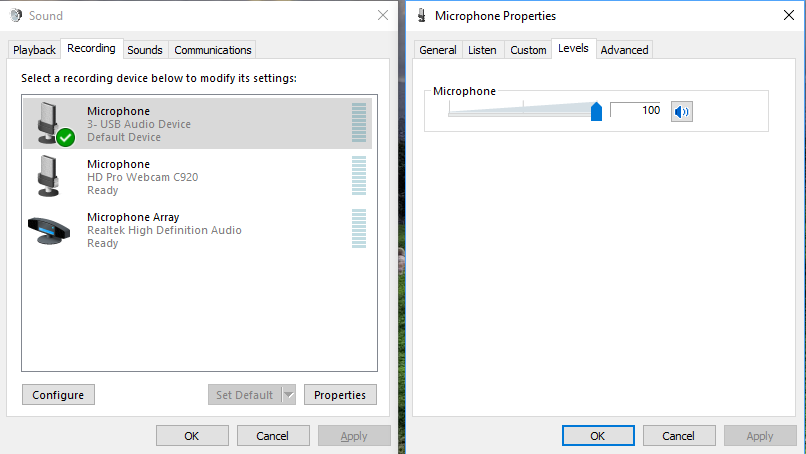
One of the questions Kevin asked prompted me to check the microphone level in the Windows 10 “Sound control panel”. One way to get to this in Windows 10 is to click the Windows start menu button and then type “sound”. Hopefully you’ll get an item under Best Match that is the Sound control panel.
After opening the sound control panel I went to the Recording tab. I right clicked the the Microphone device with the label “USB Audio Device” and selected Properties from the pop-up menu.
In the Properties window I went to the Levels tab and found the microphone level was at 35. I increased it to 100 and clicked the OK button on the Properties window and the Sound window.
I then retested the device in Google hangouts and I could clearly hear myself through the headset microphone.
I do remember noticing that that for whatever reason, that level value was already at 100 when I plugged the USB-AUDIO device into a USB port directly on the computer.
I don’t know why I didn’t think to try increasing it before posting here. Anyway, it’s resolved and maybe this will help someone else with a similar problem. 
Thank you Kevin for your help.
-Bryan