I purchased these to have 2 portable screen to use with my work issued “Intel Core i5 v Pro”. The 2 screen came with a USB C to USB C charger. When plug a screen into my only USB C port it says “no signal” and quickly goes black. Then nothing. When I use a USB C splitter that I have and plug one end into the USB and the USB C into the portable monitor it says “no signal” and quickly goes black. Then nothing. This also didn’t come with a way to charge it through an outlet. (Though I was hoping I didn’t need any more cords, and it would charge through the Intel core i5 Pro). Can someone help me the this. I’d really like to get the tall cumbersome computer monitor stands off my desk. Thanks!
Hello,
Thank you for contacting Plugable! I’m sorry the USBC-PDMON displays aren’t working as expected, and I’ll be happy to assist.
For the USBC-PDMON to work correctly, there’s three main requirements:
- The USB-C port on the host computer must support DP Alt mode (the technology used for the portable monitor uses to output video)
- The USB-C cable used to connect the USBC-PDMON to the computer must also support DP Alt mode - we include a cable in the box with the portable monitor that is compatible with it, and specifically recommend using this cable.
- The host USB-C cable must be supported to the host USB-C port on the USBC-PDMON. This port is marked with a laptop icon as shown below:
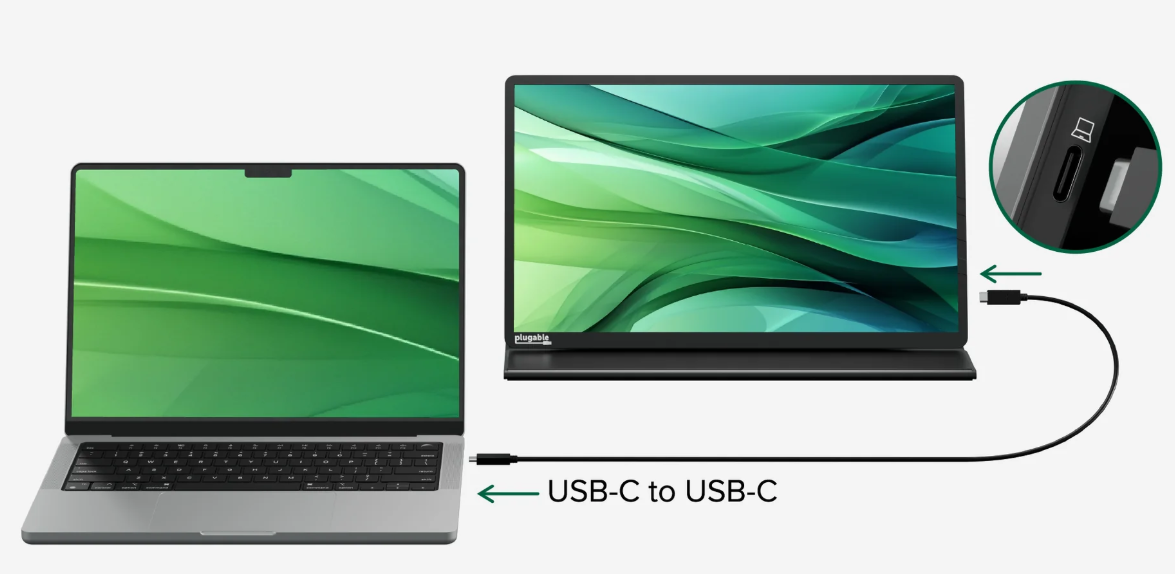
If you’re already using the correct cable and plugging it into the correct port on the display, then I suspect this issue could be the result of an incompatibility with your computer. To confirm if this is the case, we’ll want to review some additional details. I saw that you also emailed us directly, so I’ve responded to your message with a request for these details. Note that they include personally identifiable information, so please do not post them here in our public forum.
Apologies for the frustration, and thank you for giving us the chance to help!
Sam
Plugable Technologies
Do you sell a cord that goes from the DP Alt mode to the side of the portable monitor?
Thanks
Jennifer Carter
The USB-C cable included with the USBC-PDMON works to connect the portable monitor to a DP Alt mode enabled USB-C port.
If you no longer have these cables and need a replacement we may be able to provide one under the USBC-PDMON’s two year warranty, or you could purchase a compatible replacement cable. One option that would work is USBC-C100: https://plugable.com/products/usbc-c100
That said, if you do still have the original cables from the USBC-PDMON there could be other reasons why the portable monitors are not working with your computer. I’d be happy to help troubleshoot these possible issues if this is the case.
My apologies again for the frustration.
Sam
Plugable Technologies